Windows, Office and Server each require the appropriate guide.
Help with Windows error messages
Our PDF covers the most important Windows error codes with simple step-by-step instructions for activation, installation and troubleshooting, including switching from Windows Home to Pro.
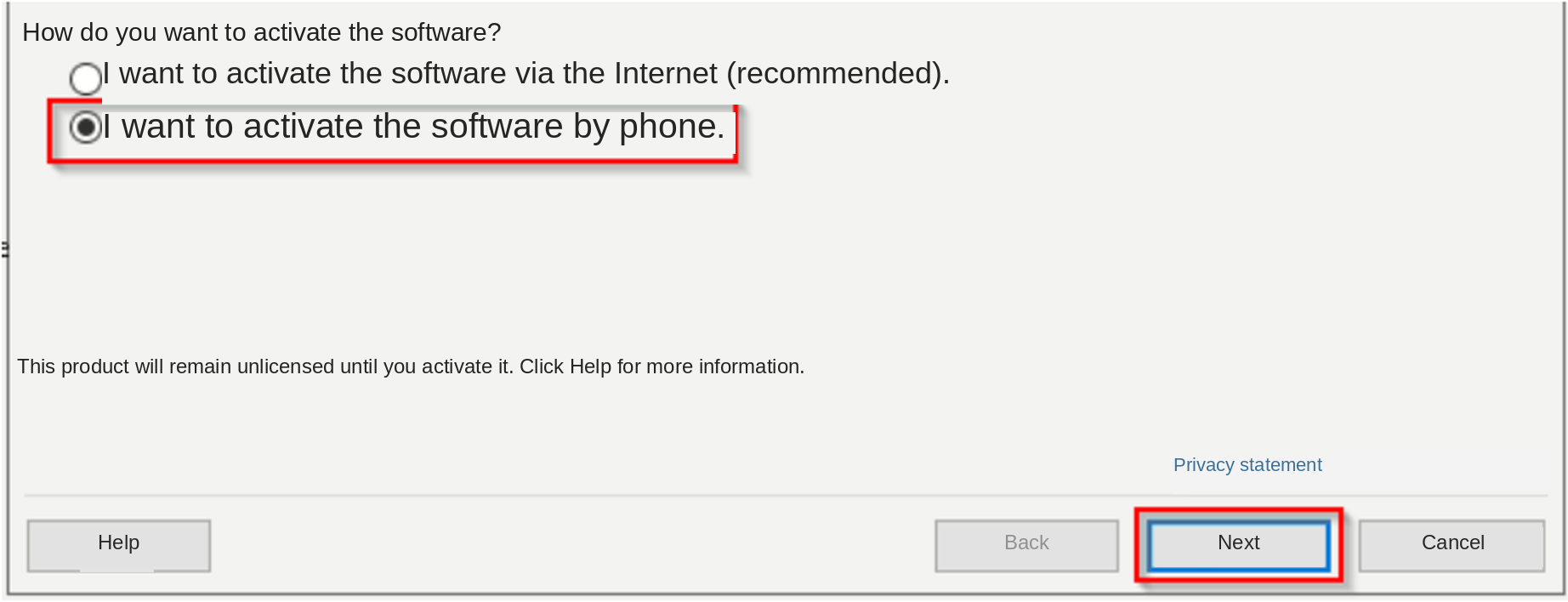
Hold the Windows key and press R. In the Run window, replace existing text with slui 04 and select OK. slui 4 also works.
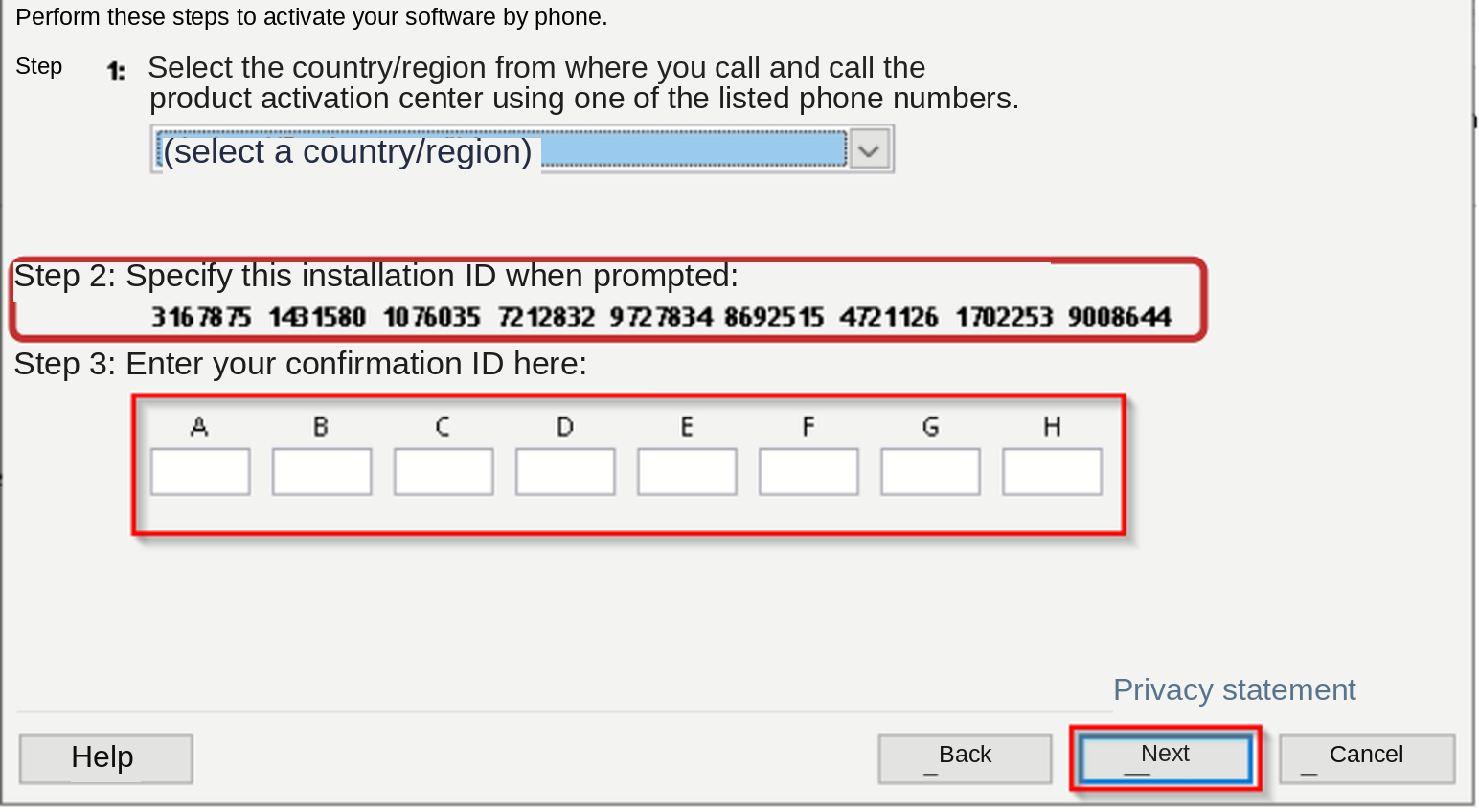
Choose your country or region, then Next. Note the Installation ID: the long number in several groups. Keep this window open. If it does not appear, use the alternative below.
Original illustration; use your own values. Click to enlarge.
Complete telephone activation
Call the number displayed in your own Windows window. Follow the prompts and provide every Installation ID group. Answer questions about usage truthfully. If telephone activation is unavailable, use the alternative below.
Write down the Confirmation ID from Microsoft. Select Enter Confirmation ID and enter the groups in A through H, then Activate Windows. Check that Activation settings shows Active.
If unsuccessful, use the alternative or contact support. First attempt activation yourself; send the Installation ID additionally as checked text, not only an image.
Original illustration; use your own values. Click to enlarge.
If SLUI or the telephone route does not work
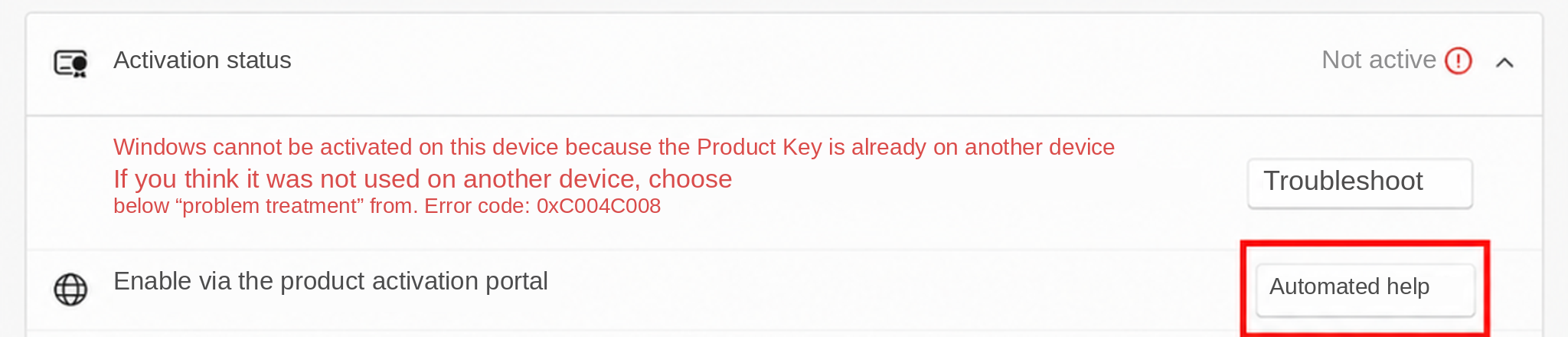
Open Activation settings through Start search. Choose Automated help if available, or Activate by phone on older versions, to display your Installation ID.
Open the official Microsoft Product Activation Portal. Choose your language, get started and continue with sign-in. Use your own Microsoft account. Choose Activate a Microsoft product > Windows > your version. Enter your complete Installation ID, check it twice and submit.
Enter a returned Confirmation ID as described above. If your Installation ID is missing or any step fails, contact support.
Original illustration; use your own values. Click to enlarge.
Only for activated Windows Home and a purchased Pro licence. If Pro is already installed, use the purchased key directly. For N, Enterprise or Education, contact support first. Save documents and back up important files.
Check that Activation settings shows Home and Active. Temporarily disconnect Ethernet and Wi-Fi. Keep these instructions open.
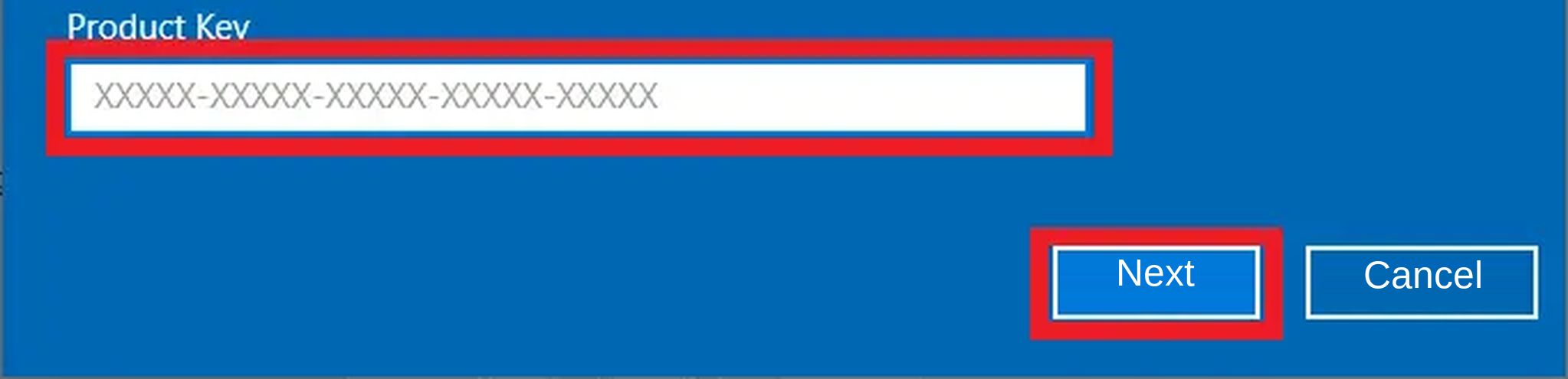
Choose Change product key and enter VK7JG-NPHTM-C97JM-9MPGT-3V66T. This generic key changes the edition only; it does not activate Windows.
Then activate with your purchased Pro key
Select Next and follow the edition-change prompts. Let the process and any restart finish. If Home remains installed, contact support.
Reconnect Ethernet or Wi-Fi and test a website. In Activation settings, confirm Pro, choose Change product key and enter your purchased Pro key, not the generic key again. Select Next/Activate.
Check Pro and Active. For 0xC004C008 follow the SLUI and alternative instructions. For 0xC004C060 contact support directly.
Original illustration; use your own values. Click to enlarge.
Windows is not accepting the product key. We will check your order and find the appropriate solution. Please send your order number and these two screenshots.
Screenshot 1: the complete error message. Keep the whole error window open. Press Windows + Shift + S, drag a rectangle around the complete message, release, click the image notification and save the image.
Screenshot 2: System information showing the edition. Open Start → Settings → System → About. Scroll to Windows specifications and leave Edition visible (for example Windows 11 Home or Pro). Save a screenshot of this as well.
Email webshop@software-guru.shop. Include your order number and attach both screenshots using the paperclip. We will check the details and explain the next step.
Check Microsoft runtime system requirements. Current downloads support Windows 10/11; ask support for a compatible older release on older Windows versions. Do not download individual DLL files from third-party websites.
In Word > File > Account > About Word, check whether Office is 32-bit or 64-bit. If Word will not open or the information is unavailable, contact support.
Download the matching official Microsoft Visual C++ package using the buttons and open it.
Choose Install or Repair if offered. Restart the PC and open Office again.
Reinstallation does not reset the limit. This Office guide asks you to first try telephone activation yourself, if offered. Have a phone, paper and pen ready.
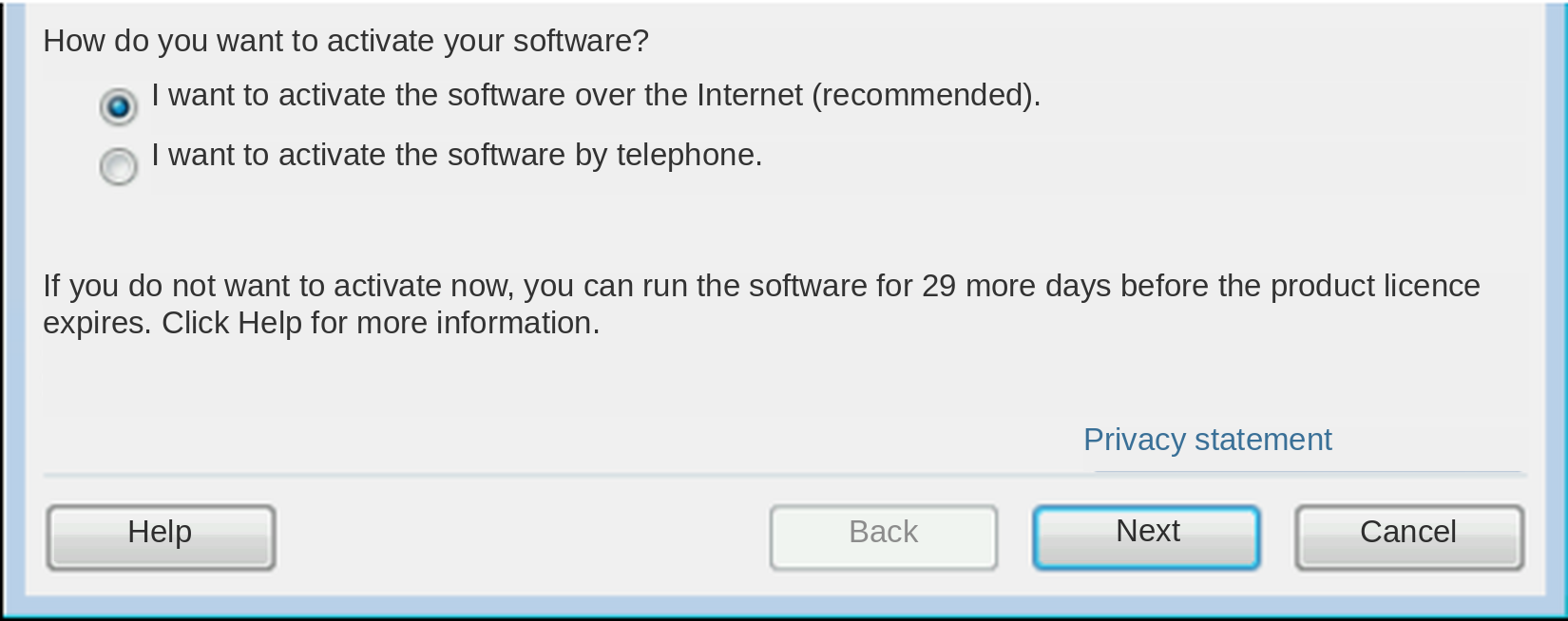
Open Word > File > Account > Activate Product. Choose “I want to activate the software by telephone”, then Next. Keep the window open.
Choose your country and call the number in your own window. Provide the Installation ID group by group when requested.
Enter the returned Confirmation ID in A through H, then Next. If the telephone option is missing or Microsoft names a website, use the linked Microsoft help. After an unsuccessful attempt, send order number, screenshot and the Installation ID additionally as text, checking each group twice.
Original PDF illustration. Do not copy example numbers. Click to enlarge.Original PDF illustration. Do not copy example numbers. Click to enlarge.
In Office 2010, activation is under File > Help. Menus shown may differ by Office version.
Windows Server – complete activation and troubleshooting handbook
Need help activating Windows Server or seeing an error message? Our complete handbook for Windows Server 2019, 2022 and 2025 provides clear explanations and simple step-by-step instructions.
The common error codes 0x80070032 and 0xC004F050 are covered at the beginning. We explain what they mean, how to check your installed Server version and what to do next. You will also find help with other activation errors and converting an evaluation installation to a suitable full version.
Read the guide for your error message at your own pace. Each step is described individually so that you can follow it even without extensive computer knowledge.
Still need help? We are happy to assist. Send support your order number, a readable screenshot of the complete error message and a screenshot of your installed Windows Server edition under Settings → System → About. This helps us check your case and explain the next step.
Check the activation method and evaluation installation
Windows does not support the attempted activation method for this installation. An Evaluation edition may still be installed. Check the edition before proceeding.
Open Start, type cmd, right-click Command Prompt and select Run as administrator. Confirm Yes. On Server Core your IT uses the administrator console. To copy a command, select it and press Ctrl+C; right-click in the console to paste, then press Enter.
Original PDF illustration. Do not copy example numbers. Click to enlarge.
Run Get-CurrentEdition below. If the result contains Eval (for example ServerStandardEval or ServerDatacenterEval), follow the conversion steps. Without Eval no Evaluation conversion is needed: if your purchase matches, go directly to the purchased key and activation section. If the method or key is still rejected, send support the full error, edition output and order number.
DISM /online /Get-CurrentEdition
Windows Server 2019/2022/2025: check Evaluation edition and activation
0x80070032 and 0xC004F050 can occur when applying a purchased key to an Evaluation edition. The code alone does not establish this cause; check current and supported target editions first.
For matching Standard/Datacenter evaluations, not automatically for Essentials, CALs or Core Add-Ons. Conversion and successful activation are separate checks.
Back up data and server configuration and schedule maintenance. An Evaluation Active Directory domain controller cannot convert directly to retail; have IT plan the supported migration.
Open Command Prompt or PowerShell explicitly as administrator. Check the current edition and available target editions:
Continue only if the current edition includes Eval and the purchased target is explicitly listed. If unavailable or the licensing channel differs, contact the administrator or support.
Save and read the Microsoft licence terms for the confirmed target edition first. The conversion command with /AcceptEula requires your agreement.
Let conversion finish. Restart only when requested in the planned maintenance window. Check the edition again and separately verify actual activation in Windows activation settings.
DISM /online /Get-CurrentEdition
If it fails, do not try random keys or editions. Send order number, full error and Get-CurrentEdition/Get-TargetEditions output to support. Hide the product key before taking screenshots.
If your purchased key is not installed yet, replace the XXXXX groups with your matching key. Once the key is accepted, run /ato and then /dli separately. The licence status must show Licensed. An edition change alone does not confirm activation.
slmgr.vbs /ipk XXXXX-XXXXX-XXXXX-XXXXX-XXXXX
slmgr.vbs /ato
slmgr.vbs /dli
Still need help? We are happy to assist. Send support your order number, a readable screenshot of the complete error message and a screenshot of your installed Windows Server edition under Settings → System → About. This helps us check your case and explain the next step.
The Software Protection Service reported an invalid product key. Compare your order with the installed Server year (2019, 2022 or 2025) and Standard or Datacenter edition. Check all 25 key characters carefully once. An Evaluation installation is another possible cause.
Open Start, type cmd, right-click Command Prompt and select Run as administrator. Confirm Yes. On Server Core your IT uses the administrator console. To copy a command, select it and press Ctrl+C; right-click in the console to paste, then press Enter.
Original PDF illustration. Do not copy example numbers. Click to enlarge.
Run Get-CurrentEdition below. If the result contains Eval (for example ServerStandardEval or ServerDatacenterEval), follow the conversion steps. Without Eval no Evaluation conversion is needed: if your purchase matches, go directly to the purchased key and activation section. If the method or key is still rejected, send support the full error, edition output and order number.
DISM /online /Get-CurrentEdition
Windows Server 2019/2022/2025: check Evaluation edition and activation
0x80070032 and 0xC004F050 can occur when applying a purchased key to an Evaluation edition. The code alone does not establish this cause; check current and supported target editions first.
For matching Standard/Datacenter evaluations, not automatically for Essentials, CALs or Core Add-Ons. Conversion and successful activation are separate checks.
Back up data and server configuration and schedule maintenance. An Evaluation Active Directory domain controller cannot convert directly to retail; have IT plan the supported migration.
Open Command Prompt or PowerShell explicitly as administrator. Check the current edition and available target editions:
Continue only if the current edition includes Eval and the purchased target is explicitly listed. If unavailable or the licensing channel differs, contact the administrator or support.
Save and read the Microsoft licence terms for the confirmed target edition first. The conversion command with /AcceptEula requires your agreement.
Let conversion finish. Restart only when requested in the planned maintenance window. Check the edition again and separately verify actual activation in Windows activation settings.
DISM /online /Get-CurrentEdition
If it fails, do not try random keys or editions. Send order number, full error and Get-CurrentEdition/Get-TargetEditions output to support. Hide the product key before taking screenshots.
If your purchased key is not installed yet, replace the XXXXX groups with your matching key. Once the key is accepted, run /ato and then /dli separately. The licence status must show Licensed. An edition change alone does not confirm activation.
slmgr.vbs /ipk XXXXX-XXXXX-XXXXX-XXXXX-XXXXX
slmgr.vbs /ato
slmgr.vbs /dli
Still need help? We are happy to assist. Send support your order number, a readable screenshot of the complete error message and a screenshot of your installed Windows Server edition under Settings → System → About. This helps us check your case and explain the next step.